The Agentic AI Program from Carnegie Mellon University's School of Computer Science Executive Education, delivered in collaboration with Emeritus, runs seven weeks, live and online. Each week has one faculty-led session and two hands-on labs, and the program ends with a capstone. Our founder, Rohan Singh, teaches the Guided Virtual Labs and built the teaching layer for all fourteen of them: a live, animated slide deck and a cell-by-cell instructor guide for every lab.
The audience is working engineers: AI and ML engineers, backend and platform engineers, data scientists. They already know Python and have already used an LLM. They don't need to be told agents are exciting. They need to see what one actually is, and then build one.
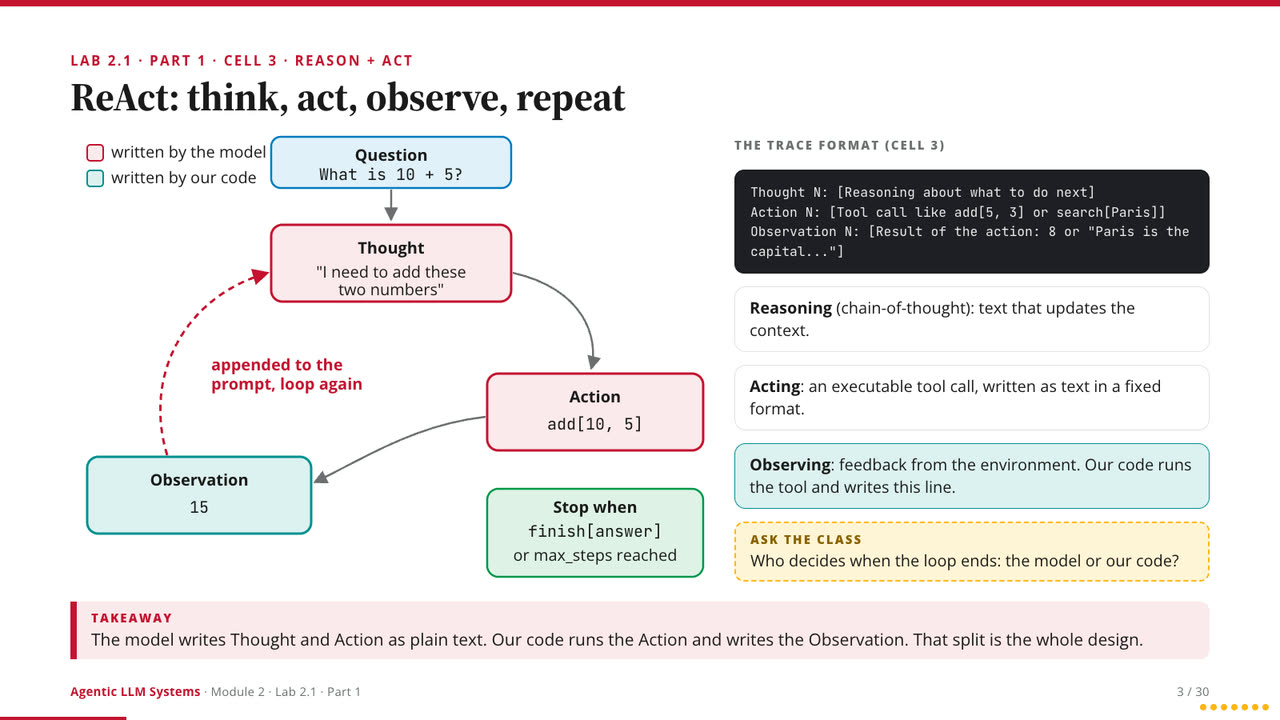 The ReAct loop from Lab 2.1, separating what the model writes from what our code writes
Decks built to keep pace with the code
In a lab, students have a notebook open, and the slides have to keep pace with the code without giving the answers away. So the decks are built around reveal on keypress: nothing appears until the instructor presses a key. Students predict first, then the class looks. On a slide for a code cell, a keypress types in what that cell actually printed when it ran.
Diagrams build one step at a time instead of appearing finished. A finished figure is something you glance at; a diagram that assembles itself in front of you is something you follow. Each lab is its own deck, so any lab can stand on its own, and every deck opens with a plain-language big picture and closes with the same shape: a handful of takeaways, a few discussion questions and a one-sentence bridge to the next lab. Speaker notes, a clickable outline and fullscreen are built in.
Guides that make a lab teachable
The guides are the other half. Each one has a time budget for every section, "ask the class" prompts placed at specific moments, notes on what students should expect to see, and notes on the mistakes to watch for. While teaching, the notebook runs on one screen and the guide on the other. The guides also double as onboarding for new lab instructors and TAs.
An agent is just a loop around an LLM
That is the framing the labs open with, and almost everything in the course is a variation on it. A bare model guesses text, so it needs tools. Tools need a loop. The loop needs memory, search and coordination. And once it can act, it needs guardrails and someone watching.
What the fourteen labs cover
- Foundations: next-token prediction, model choice as a quality, cost and latency tradeoff, tokenization, and the Model Context Protocol.
- Agent architecture: a ReAct agent written by hand with no framework, then the same tools given to a model four ways, from hand-written ReAct to an MCP server.
- Retrieval: a small dense passage retriever and Maximal Marginal Relevance built from scratch, weighing long context against RAG against agent memory.
- Reasoning and harnesses: Tree of Thoughts rebuilt on the Game of 24, then a minimal coding-agent loop compared against the coding agents students already use.
- Multi-agent workflows and fine-tuning: LangGraph state, routing, retries and failover, and LoRA fine-tuning on a small open model.
- Evaluation and guardrails: layered guardrails before, during and after generation, trajectory logging and monitoring with human escalation.
- Capstone: packaging an MCP server, a skill, a sub-agent and hooks as a single plugin, and a research agent judged on the quality of its report.
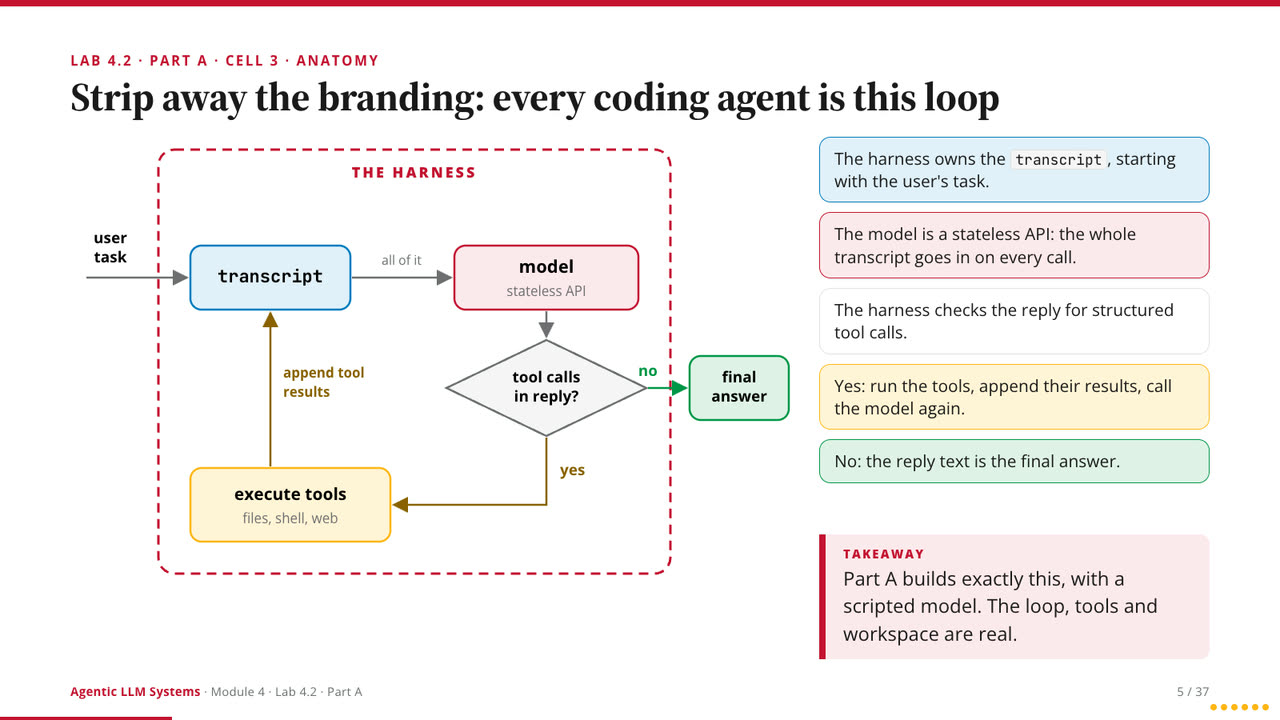 Lab 4.2: every coding agent reduced to the loop it shares
Two principles behind every lab
Build it by hand before you use the framework. A ReAct loop with no library. A harness in a couple dozen lines. Then the same idea at production scale. Once you have written the loop yourself, a framework stops being magic.
Failure is the lesson. Most labs run on small local open models on purpose, so the class can watch scale effects and breakdowns directly. Where things break is usually where the understanding is.
Teaching is a different discipline from building: you cannot hand-wave a step when someone is about to run it. The same habits, plain framing, real output on screen and honest failure cases, are how we hand systems over to client teams.